SpeedVPN Secure VPN Proxy1.8.9
Publisher Description
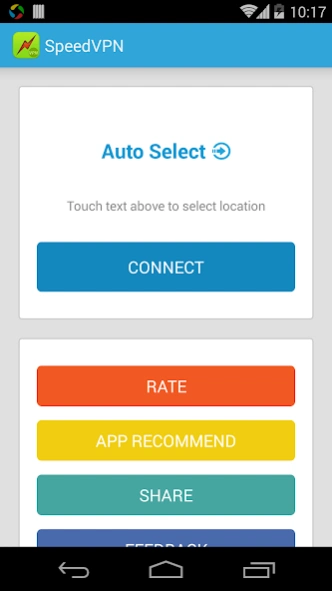


SpeedVPN, Secure VPN proxy. One click to connect, multi locations to select
SpeedVPN, Best Free VPN client.
One click to connect, multi locations to select.
Unlimited free time and premium bandwidth.
• One-click to connecting VPN
• Unblock geographically restricted websites
• Multi locations to connect including France, Canada and United States
• Speeds up your network browsing
• Get 240 minutes free time for each connection, connect as many times as you like
• Protect your privacy, prevent tracking
• No registration required, no settings required
• No system root required
• Reliable servers and premium traffic
About SpeedVPN Secure VPN Proxy
The company that develops SpeedVPN Secure VPN Proxy is GoSpeed Software. The latest version released by its developer is 1.8.9. This app was rated by 7 users of our site and has an average rating of 3.6.
To install SpeedVPN Secure VPN Proxy on your Android device, just click the green Continue To App button above to start the installation process. The app is listed on our website since 2026-09-30 and was downloaded 12,170 times. We have already checked if the download link is safe, however for your own protection we recommend that you scan the downloaded app with your antivirus. Your antivirus may detect the SpeedVPN Secure VPN Proxy as malware as malware if the download link to us.gospeed.speedvpn is broken.
How to install SpeedVPN Secure VPN Proxy on your Android device:
- Click on the Continue To App button on our website. This will redirect you to Google Play.
- Once the SpeedVPN Secure VPN Proxy is shown in the Google Play listing of your Android device, you can start its download and installation. Tap on the Install button located below the search bar and to the right of the app icon.
- A pop-up window with the permissions required by SpeedVPN Secure VPN Proxy will be shown. Click on Accept to continue the process.
- SpeedVPN Secure VPN Proxy will be downloaded onto your device, displaying a progress. Once the download completes, the installation will start and you'll get a notification after the installation is finished.
Program Details
System requirements
Download information
Pricing
Version History
version 1.8.9
posted on 2026-09-30
Fix connection issue
Fix some crash bugs
version 1.6.9
posted on 2023-12-10
Fix connection issue
version 1.6.1
posted on 2020-04-22
Fix connection issues
version 1.6.0
posted on 2019-08-11
Fix connection bugs
version 1.5.8
posted on 2019-04-05
Fix connection issue
Add VIP support
version 1.5.4
posted on 2016-09-08
You can choose location (country) now.
version 1.2.1
posted on 2014-11-06
Several fixes and updates
